
How to Play Merpati Terbang
Flap controls, city obstacles, food and scoring, areas, time of day, weather, and how to unlock pigeon skins.
Merpati Terbang (Flying Pigeon) is an arcade flying game you can play free in your browser. Its hero is a city pigeon that keeps flying forward over rooftops, parks, markets, stations, high-rises, and the town square. You only have one button, the wing flap, but that one button is enough to get your heart racing when the gap ahead starts to narrow.
This guide explains the controls, how flapping works, the different city obstacles, scoring and food, the changing areas and time of day, the weather, and how to unlock pigeon skins. Read it from the top if it’s your first time.

The goal
The goal of Merpati Terbang is simple: fly as far as you can without hitting anything. The pigeon moves forward on its own, while obstacles arrive from the right in top and bottom pairs. There’s always a gap between them wide enough to fly through.
Every pair of obstacles you pass is worth one point. Food you pick up along the way adds bonus points. The game ends the moment the pigeon touches an obstacle, another bird, or the ground. The end screen then shows your score, your best score, the food you collected, and a button to play again.
Controls
Merpati Terbang uses just one action: flapping. Each flap lifts the pigeon a little, then gravity pulls it back down. Holding the button does nothing, so what matters is the rhythm of your taps, not how long you press.
You can play on a phone in portrait or landscape, or on a computer. Before takeoff the pigeon hovers in place and waits for your first tap, so you have time to get ready. The controls are listed in the table below.
| Action | Touchscreen | Mouse | Keyboard | Gamepad |
|---|---|---|---|---|
| Flap | Tap anywhere | Click | Space / ↑ / W | A |
| Pause | Pause button | Pause button | Esc / P | Start |
How flapping and gravity work
Each flap resets the bird’s vertical speed upward. Tapping too frequently keeps it climbing and can take it outside the safe gap. Gravity pulls it down again between taps. Practice leaving enough time between flaps to control altitude.
That means two quick flaps in a row send the pigeon shooting up, while spacing your flaps out lets it sink gently. The pigeon can’t fly off the top of the screen, but touching the ground ends the game straight away. You can also read the pigeon’s movement from its tilt: its head points up while rising and down while falling.
City obstacles
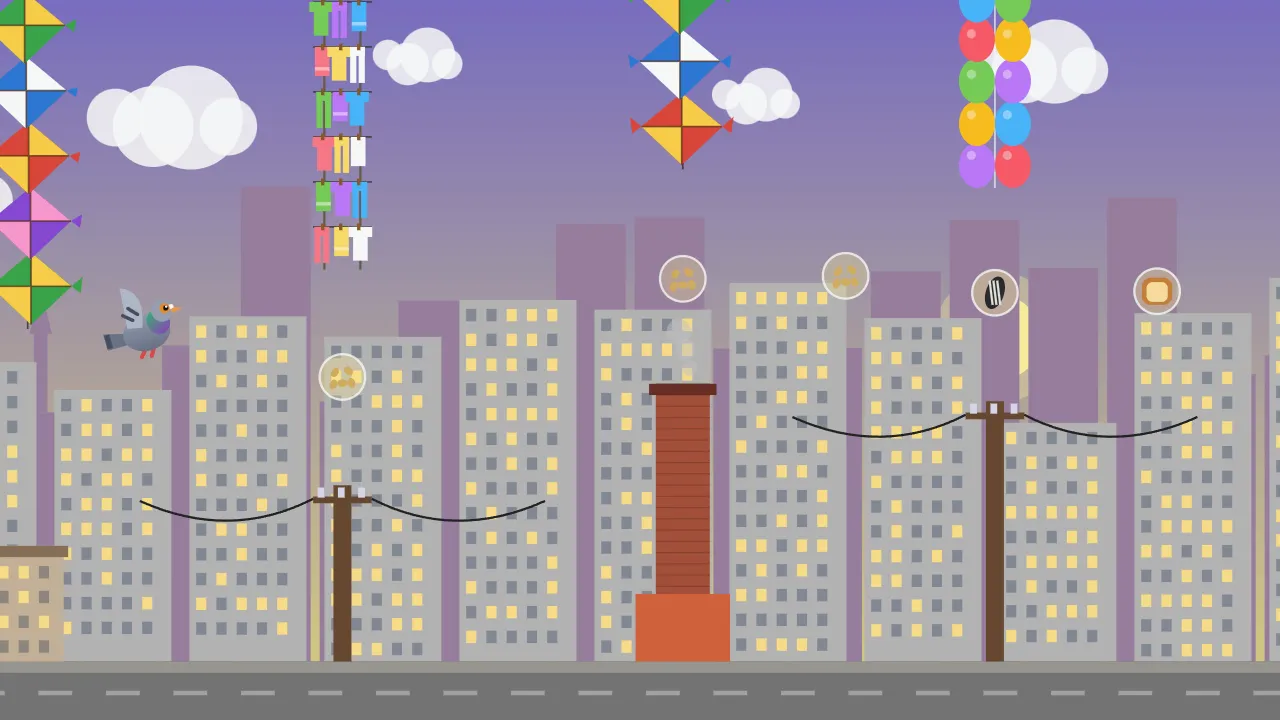
Unlike similar games that use pipes, the obstacles in Merpati Terbang come from everyday city scenery. Bottom obstacles stand up from the ground, while top obstacles hang down from the sky. They all look different, but the rule is the same: don’t touch any part of them.
Bottom obstacles include buildings with windows, power poles with their cables, leafy trees, brick chimneys on rooftops, TV antennas, and billboards. Top obstacles include strings of balloons, stacked kites, piled-up washing lines, and the tangled cables you see above city streets. After a while, some obstacles start drifting slowly up and down, and other birds begin flying between them in wavy paths.
Food and scoring
Food floats along the way inside little glowing bubbles. It’s usually placed right in the middle of a gap, and sometimes between two pairs of obstacles. To collect it, just fly through it.
Each kind of food is worth a different amount, and all of it also adds crumbs that you spend on skins. Here are the details.
- Bread and seeds: +1 point and 1 crumb.
- Corn: +2 points and 3 crumbs.
- Sunflower seeds: +3 points and 5 crumbs, and the rarest.
Difficulty that rises gently
At the start, the pigeon flies slowly and the gaps are wide, so new players can enjoy the game right away. As more obstacles appear, the speed increases, the gaps narrow, and the distance between obstacles shrinks.
The increase is smooth, with no sudden jumps. There’s never a moment where the game suddenly becomes much harder, so every failure feels like “almost”. From around the 12th obstacle, some obstacles start moving up and down. From around the 20th, other birds fly past as well. When your score gets close to your record, the game also tells you how many more points you need.
City areas, time of day, and weather
Merpati Terbang doesn’t stay in the same place. Every 15 points the city changes area: Rooftops, City Park, Market, Station, High-Rises, and Town Square, then the cycle repeats. Every 25 points the time moves on from morning to midday, evening, and night. At night building windows light up and stars appear in the sky.
After a score of 10, the weather starts changing every dozen or so seconds. Clouds and rain darken the view. Strong wind, shown by white streaks and flying leaves, nudges the pigeon slightly up or down, so you’ll need to adjust your flapping rhythm.
Pigeon skins
The crumbs you collect each game are saved and can be spent on new pigeon looks in the Skins menu. Every skin only changes appearance, so they all fly exactly the same.
There are eight skins. The grey Classic pigeon is available from the start. White costs 60 crumbs, Brown 120, Black 220, Racer 350, Tiny Hat 500, Shades 750, and Golden 1,200. Any skin you’ve unlocked can be used at any time.
Frequently asked questions
These are the questions Merpati Terbang players ask most often. Most of them are about saving and purchases.
We’ve kept the answers short so they’re easy to read.
Are my record and crumbs saved?
Yes. Your best score, crumbs, skins, and statistics save automatically in your browser’s local storage, with no account needed. Clearing site data in your browser deletes them too.
Can crumbs be bought with money?
No. There are no in-game purchases. Crumbs only come from picking up food while you play.
What to do next
Once you understand the basics, try a few games while focusing on one thing: flapping in a calm rhythm instead of panicking. Most players see their score jump as soon as they stop tapping too often.
For record-breaking strategy, read the Merpati Terbang high-score tips. Or jump straight in and play Merpati Terbang.
Practice without chasing food
On one attempt, focus only on passing gaps and leave food outside your safe route. After a few gaps, try collecting food directly in the middle. Comparing these choices helps you recognize when chasing food adds risk. Skins change appearance; do not rely on them instead of controlling your flaps.
Continue practicing in Merpati Terbang.